 Most of the organizations today use their own VPN solution allowing their employee to access their office pc from home. This is generally limited to very few and eligible associates, but what about them who are not eligible. For our friends who do no have idea of VPN, let me give a brief introduction about this VPN. VPN is an abbreviation of Virtual Private Network. This is the network established between two computers over internet cloud. You may get a question, what is the difference between other computers connected over internet. The difference is that VPN is highly secured network, it establishes a tunnel between two computers so that other computers will not be able to interfere between this communication. This is highly secured and encrypted as most of the company data will flow over this tunnel. Generally a client is installed on your laptop to access office PC. But the new VPN technology called SSL is totally browser based and runs with some Active X controls installed on your laptop.
The above was a brief introduction to what is VPN. But our discussion today is about other methods of accessing your PC. Infact, using this software you can access any PC over internet. These two services are GotoMypc and LogMeinrescue, GotomyPC is a client based where, you need to install a client on the PC which you want to take control, whereas LogMein is browser based and works like a SSL VPN. I came to know about this services a year back but didn’t find time to review it on Technical Herald. Now I got the time, so doing the same, Lets see how you can use these services.
GotoMyPC
This is a direct remote control, a client should be installed and configured with an Access code on your office pc. For remote controlling your office PC, you can directly login to the site and click on connect button beside the name which you have given to your office PC. Let’s see step by step procedure to use this tool.
Login to gotomypc.com site and create an account to get a free 30 days trial to use this service.I would recommend you to enter the credit card details, so that the account will be renewed after 30 days of trial period. But there is also another way to get the free trial without entering the credit card details.If you close the browser without entering the credit card information, you will get a pop up advertisement as below: Just click yes and you are in for installing the client. Installing the client will take a few minutes based on your connection speed. While installing gotmypc client, you will be asked to enter the email address which you have used for logging onto the site. One more thing is Access Code which must be 8 characters in length.
 All the above steps makes your office PC ready to be connected from home. Follow the below steps to remote control your office PC.
login to gotomypc.com site with the account used for configuring client on office pc.You will see the name of your office PC in your account. Click on connect and you are in within few mins of installing ActiveX controls on your home pc.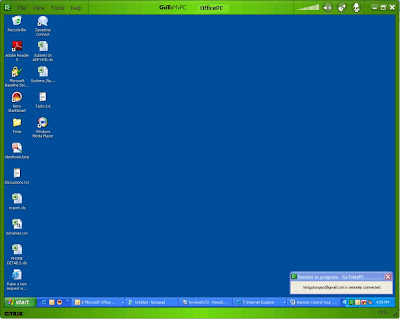
You can also place a shortcut icon on your desktop so that you don’t have to login to the account while connecting your pc next time. For this, click on File and select create shortcut to “officepc” where officepc is the nick name given to the pc which you want to remote control
This is how you can use Gotomypc service. Please check the Demo of this service
hereLogmeinAnother service is logmein, As I have mentioned above, this is just like SSL VPN solution. There is no need to install any client on the PC which you want to remotely login. This is generally used for commercial purpose by home based system administrators wherein, the technician can remotely login to customer’s desktop over internet to resolve the issue reported by customer. So you can find this useful only if you are working for such organization. However a trial version of this service can also be used for remote controlling your office PC. But only disadvantage is that, some one should be available near your office PC to accept the connection initiated by you. Lets see step by step procedure for using this serice.
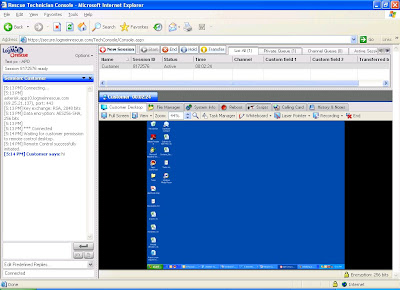
First and foremost, is creating an account on the site Logmeinrescue After creating a trial account, a technician console will be installed on the pc form which you want to initiate the connection.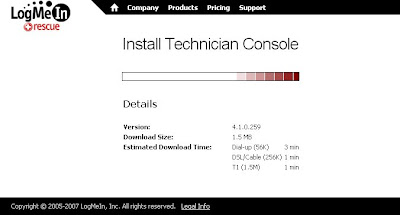 This is just an Active X kind of control which will be installed on your desktop. However the connection is through the web browser over internet.Technician console contains links for starting a new session. Click on this button will get one popup which contains the secure token to establish communication. You can communicate the token key to the person sitting on your office PC or you can also use the free email service to mail the secure link to that personClicking that link will bring your pc in your control, but not fully. Now you need to click on start remote control button present on the technician console. This will generate a popup window on your office pc, to allow or cancel the connection. When allowed, you are in
 Security Concerns
 Let me warn you, this is not the most secure way to remote control your office pc, hence most of the organizations might have already blocked these services from entering their network. The only security concern is that, as this whole connection is over internet, there is a possibility that your pc either office or home may be hacked by a bad guy. However in large scale organizations, this is protected by firewall system, but as you know bad guys can do what we cannot imagine. Both the organizations, Logmein and Gotomypc claims that this is very secure and that they do not store any official data that goes on during the communication over internet.


 Earlier this year, HP has also announced their new strategy about the next generation Data center products. The Linux community will be closely working with HP in this area. They have a plan to Virtualizes the present Data centers with their powerful hardware and software. This would be the same concept which was covered earlier on Technical Herald. In July this year, HP had a very aggressive acquisition strategy. They acquired Opsware at an estimated cost of $ 1.6 billion. Opsware is the software maker, they have developed softwares for automating Data center administrative tasks. Another acquisition was of a thin client maker Neoware, this was based at $ 214 billion. Neoware also designs virtualization softwares to ease the desktop management in an organization. By reading this, you might got an idea as to how HP is growing and this simply implies us to think in other direction which is “The Hardware sales doesn’t matters for HP”. But still there are very dashing server products from HP like the Blade Server, which is basicly used to virtualize your data center with either VMware or other virtualization software products offered by HP under the above mentioned acquisition.


